Faculty of Commerce

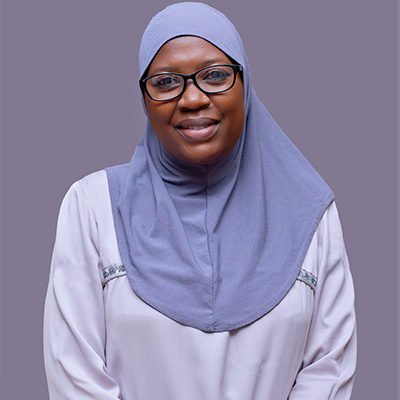
Welcome to the Makerere University Business School, Faculty of Commerce! 

I am delighted that you have chosen to become part of our fraternity, whether as a student, faculty or staff member, or a partner in our activities at the Business School. It is apparent that one of the first things you will discover is that all of us here share the mission of improving education and the value we would like to leverage on. We are aware that the opportunities that result from a great university education and experience is critical to fostering thriving individuals and societies as well as addressing pertinent challenges in Uganda, the region and globally.

As one of the oldest and largest Faculties of Makerere University, we take pride in how far we have come and look to the future focusing on the change and impact we want make across all segments of our communities. We are committed to advancing academic excellence, supporting our students to become critical thinkers within their career paths and beyond, dynamic and global citizens who create and bring about positive change in the world of Business and Management. 

We believe in the value of diversity, equity and inclusion as critical areas that guide our strategy and operationalization of that strategy. This certainly enables us create a sense of belonging for our staff, students, partners and wider community that we engage with.  We have further included a diverse set of individuals to support and strengthen our ability to engage in meaningful teaching, research, consultancy and have a positive impact in the fields we contribute to- Finance, Accounting, Real Estate Management and Business Law.

The Faculty is a team of dedicated lecturers and scholars whose expertise and research extends the boundaries of our knowledge and contribution to the specific discourse, and whose teaching prepares students for wide-ranging careers and lifelong learning. The Faculty of Commerce has referred journal editors, board members, consultants and a host of others recognized by their peers as leaders in their specific fields of expertise.

Our partnership with local and international academic institutions, private sector- industry, professional bodies, development partners, government agencies, and a broad range of other constituents across the region and beyond help us offer dynamic, market responsive and engaging experiences to our students which simultaneously address the needs of the industry and community at large. 

I invite you all who would like to enrich your careers or become our partners to explore through our website the broad opportunities available in the Faculty of Commerce. On our website, you will read about the academic programmes, staff, research and projects and collaborative engagements with various stakeholders which shape our collective growth, sustainability and contribution to society as well and our Mission and Vision. I hope you will join our family of life-long learners and partners.

Shine On, Faculty of Commerce as we work together to make Business and Management education better than ever before!


Staff Members

Publications

Video provides a powerful way to help you prove your point. When you click Online Video, you can paste in the embed code for the video you want to add. You can also type a keyword to search online for the video that best fits your document.

To make your document look professionally produced, Word provides header, footer, cover page and text box designs that complement each other. For example, you can add a matching cover page, header and sidebar. Click Insert, then choose the elements you want from the different galleries.

Themes and styles also help to keep your document coordinated. When you click Design and choose a new Theme, the pictures, charts and SmartArt graphics change to match your new theme. When you apply styles, your headings change to match the new theme.

Save time in Word with new buttons that show up where you need them. To change the way a picture fits in your document, click it and a button for layout options appears next to it. When you work on a table, click where you want to add a row or a column, then click the plus sign.

Reading is easier, too, in the new Reading view. You can collapse parts of the document and focus on the text you want. If you need to stop reading before you reach the end, Word remembers where you finished – even on another device.


Collaborations

Video provides a powerful way to help you prove your point. When you click Online Video, you can paste in the embed code for the video you want to add. You can also type a keyword to search online for the video that best fits your document.

To make your document look professionally produced, Word provides header, footer, cover page and text box designs that complement each other. For example, you can add a matching cover page, header and sidebar. Click Insert, then choose the elements you want from the different galleries.

Themes and styles also help to keep your document coordinated. When you click Design and choose a new Theme, the pictures, charts and SmartArt graphics change to match your new theme. When you apply styles, your headings change to match the new theme.

Save time in Word with new buttons that show up where you need them. To change the way a picture fits in your document, click it and a button for layout options appears next to it. When you work on a table, click where you want to add a row or a column, then click the plus sign.

Reading is easier, too, in the new Reading view. You can collapse parts of the document and focus on the text you want. If you need to stop reading before you reach the end, Word remembers where you finished – even on another device.


Video provides a powerful way to help you prove your point. When you click Online Video, you can paste in the embed code for the video you want to add. You can also type a keyword to search online for the video that best fits your document.

To make your document look professionally produced, Word provides header, footer, cover page and text box designs that complement each other. For example, you can add a matching cover page, header and sidebar. Click Insert, then choose the elements you want from the different galleries.

Themes and styles also help to keep your document coordinated. When you click Design and choose a new Theme, the pictures, charts and SmartArt graphics change to match your new theme. When you apply styles, your headings change to match the new theme.

Save time in Word with new buttons that show up where you need them. To change the way a picture fits in your document, click it and a button for layout options appears next to it. When you work on a table, click where you want to add a row or a column, then click the plus sign.

Reading is easier, too, in the new Reading view. You can collapse parts of the document and focus on the text you want. If you need to stop reading before you reach the end, Word remembers where you finished – even on another device.


Downloads

Contact Information

We are eager to hear from you. Please fill in your contact information and one of our staff members will contact you shortly.

MORE UNIVERSITY FACULTIES

Faculty Of Management

The Faculty of Management has a Bachelor of Human Resource and Bachelors in Leadership and

Faculty of Graduate Studies & Research

Vision: In line with the school vision, the faculty aspires to enhance performance and compositeness

Scroll to Top